

Imagine running a small business. At first, you need a website to introduce your services, show your work, and help potential customers contact you.
As your business grows, your needs change. Customers want to log in, book appointments, manage orders, or track requests. Your employees may also need dashboards, reports, and tools to manage daily operations.
At that point, a regular informational website might no longer be enough.
This is where web applications come in.
But what exactly is a web application, how is it different from a traditional website, and when is building one worth the investment?
Let's explore the differences using practical examples.
What Is a Web Application?
A web application, or web app, is software delivered through web technologies that allows users to perform tasks, manage information, and interact with a digital system.
Most web applications can be accessed directly through a browser without installing a separate desktop or mobile program.
Think of an online project management tool. Users can create tasks, assign responsibilities, upload files, and monitor progress.
They are doing more than reading information. They are using software to complete work.
The distinction between websites and web applications is not absolute, however. Modern websites frequently include interactive features, and many digital products combine informational pages with application functionality.
Website vs. Web Application: Key Differences
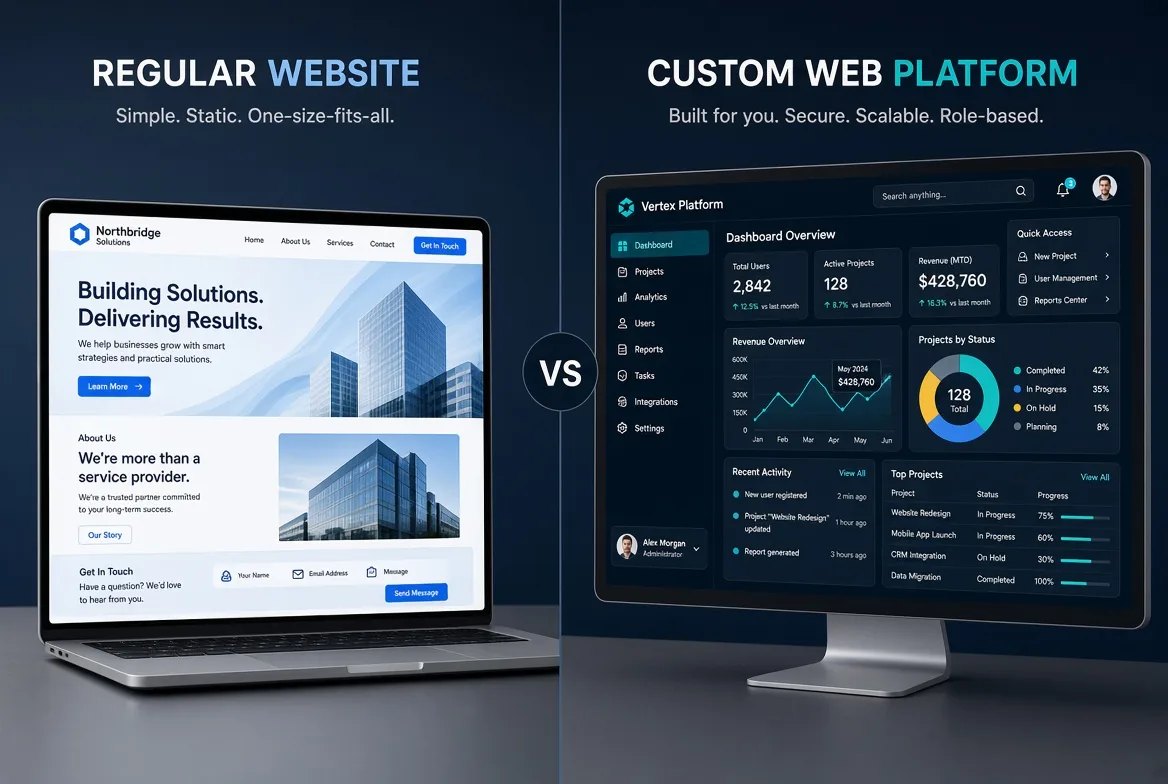
A traditional company website primarily introduces the business, presents its services, and helps visitors find information.
A customer management application, by contrast, may let users log in, create records, update information, and complete workflows.
Both use the web, but they serve different purposes.
| Feature | Traditional Website | Web Application |
|---|---|---|
| Primary purpose | Information and presentation | Tasks and business processes |
| User interaction | Often limited | Usually more extensive |
| User accounts | Optional | Common |
| Database | Depends on features | Frequently central |
| Personalization | Often limited | Commonly user-specific |
| Development complexity | Often lower | Depends on business logic |
| Typical cost | Often lower | Frequently higher for custom solutions |
| Examples | Company site, blog, portfolio | CRM, booking platform, customer dashboard |
These are general patterns rather than strict technical rules.
An e-commerce website, for example, can contain sophisticated application functionality.
Seven Practical Examples of Web Applications
1. Customer Relationship Management (CRM)
A CRM helps businesses organize customer information, track conversations, manage sales opportunities, and schedule follow-ups.
Instead of relying on scattered spreadsheets and messages, employees work with a shared system.
This can be especially useful for businesses with longer sales processes.
2. Online Booking Systems
A booking application lets customers select services, check available time slots, and make reservations.
Administrators can manage schedules, capacity, cancellations, and appointments.
A reliable system also needs to prevent conflicting bookings and enforce business rules.
3. Advanced E-Commerce Platforms
Online stores often require much more than a product catalog.
Complex businesses may need inventory management, multiple staff roles, custom pricing, payment integrations, or connections to accounting systems.
These requirements can justify a more customized application architecture.
4. Project Management Platforms
Project management web apps help teams organize tasks, assign responsibilities, share files, and track deadlines.
They provide a central workspace for coordinating projects and monitoring progress.
5. Learning Management Systems
An educational website might simply describe available courses.
A learning management application can support student accounts, lessons, quizzes, assignments, progress tracking, and certificates.
The difference is the depth of interaction and workflow management.
6. Customer Loyalty Platforms
A loyalty web application can track customer points, membership levels, rewards, and redemption history.
Businesses may connect these systems to their existing e-commerce platforms or operate them separately.
Reward rules and transaction accuracy require careful implementation.
7. Business Analytics Dashboards
A dashboard application can present sales figures, inventory information, operational metrics, and other business data.
Its usefulness depends on accurate information, reliable integrations, and appropriate user permissions.
How Does a Web Application Work?
Consider an online ordering system.
When a customer submits an order, the application may follow these steps:
-
The frontend collects the customer's selections.
-
The browser sends a request to the backend.
-
The backend checks pricing, availability, and business rules.
-
The database stores or retrieves relevant information.
-
The application displays the result.
Not every web app uses exactly this architecture, but it is a useful model for understanding how the main components interact.
Common technologies include React, Vue, Django, Laravel, Node.js, and PostgreSQL.
The right technology depends on the project's requirements, security needs, maintainability, and the development team's expertise.
Web App vs. PWA vs. Native Mobile App
These terms are related but not interchangeable.
Web Application
A web application is software built with web technologies and commonly accessed through a browser.
Progressive Web Application (PWA)
A PWA uses web technologies while offering some capabilities associated with installed applications.
Depending on implementation and browser support, PWAs may be installable, work partially offline, or integrate with certain device features.
Not every web application is a PWA.
Native Mobile Application
Native applications are developed for particular operating systems, such as Android or iOS.
They may be preferable when a project requires deep platform integration or specific device capabilities.
Hybrid and cross-platform alternatives are also available, so the choice is not always limited to web versus native.
Benefits of Web Applications
Cross-Device Access
Users can often access the same application through desktop, tablet, and mobile browsers.
Responsive design and compatibility testing remain essential.
Centralized Updates
Many changes can be deployed centrally without requiring every user to install a new application version.
However, caching and version compatibility still need careful management.
Centralized Data Management
A shared application can simplify access control, reporting, and coordination across teams.
Flexible Development
Well-designed web applications can be extended with new features over time.
Scalability, however, requires appropriate architecture, testing, and infrastructure.
Third-Party Integrations
Web applications can connect to payment providers, messaging services, accounting platforms, and other systems through supported APIs.
Challenges and Limitations
Custom web applications can require significant planning and ongoing maintenance.
Important considerations include security, privacy, accessibility, performance, backups, browser compatibility, and operational costs.
Building a complex application is not automatically better than using an existing product.
For a small company that only needs a professional online presence, a well-designed website may be the more practical solution.
How Much Does Web Application Development Cost?
There is no meaningful fixed price without understanding the project.
Development costs depend on factors such as:
-
Number of features and user roles
-
Complexity of business processes
-
Authentication and permissions
-
Data management requirements
-
External integrations
-
Security and compliance needs
-
Testing and maintenance
A simple appointment system and a multi-branch booking platform with payments and advanced reporting will require different levels of effort.
Businesses should also budget for hosting, updates, monitoring, and support.
A clearly defined minimum viable product (MVP) can help validate the concept before investing in every planned feature.
When Is a Traditional Website Enough?
A traditional website may be sufficient when your primary goals are to introduce your business, publish content, display a portfolio, generate leads, or provide contact information.
In this situation, performance, usability, SEO, and clear messaging often deserve more attention than custom application features.
A contact form or basic search feature does not automatically justify building a custom web application.
When Should You Build a Custom Web Application?
Consider a web application when users need personalized accounts, complex workflows, data management, or self-service functionality.
It may also make sense when your team repeatedly performs manual tasks across disconnected tools.
Before starting custom development, evaluate whether existing software or extensions to your current system can solve the problem at a lower total cost.
Decision Checklist
Ask yourself:
-
Do users primarily consume information or complete tasks?
-
Are user accounts and different permission levels required?
-
Does the system need to store and manage user-specific data?
-
Are several business processes connected?
-
Can existing software meet the requirements?
-
Will the product need additional functionality later?
-
What is the long-term maintenance budget?
The answers will help you make a decision based on business needs rather than technology trends.
Frequently Asked Questions
Is every e-commerce website a web application?
Many online stores contain web application functionality, including accounts, carts, checkout systems, and inventory management. The terminology is not always strictly defined.
Do web applications need installation?
Usually not. Most can be accessed through a browser, although some offer installation as PWAs.
Can web applications work offline?
Some can provide limited offline functionality when designed for it. Features that require live server data or online payments generally need connectivity.
Are web applications SEO-friendly?
Public web application pages can appear in search results when they are crawlable and indexable.
JavaScript rendering, accessible links, and URL management may require additional attention. Private user dashboards generally should not be indexed.
Can an existing website become a web application?
Often, yes. The feasibility depends on the current architecture, technology stack, and required functionality.
Conclusion: Choose the Solution That Fits Your Business
A website and a web application are not competing labels for the same investment.
They solve different problems, and many successful digital products combine both.
If your business primarily needs visibility and communication, a professional website may be enough.
If customers or employees need to complete complex tasks, manage information, or follow structured workflows, a web application may be a better fit.
At AtraByte, we believe technology decisions should begin with the problem being solved.
Our approach to web development focuses on clear requirements, practical architecture, and digital experiences designed for long-term growth.


Discussion
Thoughts on this article